A couple of years ago I crafted an internal-use utility for one of my clients that uses Azure Static Web Apps with Blazor and some Functions. That worked well, but the client asked to extend functionality, so I decided to refresh the code along the way.
Back in the day, I wrote the utility using .NET 6 and in-process functions, since the out-of-process mode was not yet available. The current .NET 8 shifted focus to the out-of-process mode, which is much better and less tied to Azure SDK code. However, according to the Azure Functions docs, they still supports in-process mode, so I anticipated an easy migration. Well, I totally misjudged that!
Azure SWA Managed Functions are not regular Azure Functions
I retargeted the projects to .NET 8 and pushed it to CI/CD, dreaming of finishing the work early and going to fly my RC helicopter. Unfortunately, the deployment failed with the error:
The function language version detected is unsupported or invalid. The following dotnet language versions are valid: 3.1, 6.0. If you are not using Azure Functions, you can skip this check by removing the ‘api_location’ input from the workflow file.
Wait, what? How come version 8 is not supported? After a short googling, I ended up in this thread about net7 support for SWA managed functions, where @philvessey made it work by switching to the isolated mode. Apparently, the runtime or the environment for so-called Managed Functions is different from the regular Functions, and not all that works with regular functions will work with the Managed ones.
Switching to the isolated mode is a good thing and worth trying, but since the amount of work is quite significant, I tried a simpler solution first - setting the env variable FUNCTIONS_INPROC_NET8_ENABLED. Too bad I could not set it, since it’s not possible to specify any env starting with FUNCTIONS_, as SWA Functions docs state.
Migrating code from in-process mode to the isolated one
There’s a utility called .Net Upgrade Assistant that aims to help you upgrade projects from previous versions of .NET, UI frameworks, and functions. At first, I decided to give it a try, since they mentioned upgrading to v4 isolated, but it seems it does not apply to upgrading from v4 in-process to v4 isolated - it found nothing to upgrade. Luckily, the MS upgrade guide does a decent job of describing the main things needed to edit.
After completing this, I had my project work locally on my Windows machine with all the tests passing.
A surprise from CI/CD
It surprised me with this error from building my project for integration tests:
error MSB3021: Unable to copy file “/home/runner/work/MyApp/MyApp/Tests/Integration/Api/BareLicenses/TestSigningKey.xml” to “bin/Release/net8.0/Api/BareLicenses/TestSigningKey.xml”. Could not find a part of the path ‘/home/runner/work/MyApp/MyApp/Tests/Integration/bin/Release/net8.0/Api/BareLicenses’.
Searching the Internet proved fruitless; this error is often caused by file path typos or permission issues, yet it showed no direct connection to the migration from in-process to isolated mode. At first, I thought that it might be some kind of a glitch and tried to set the CopyToOutputDirectory parameter for the file in the project from PreserveNewest to Always, but it did not help. I had to go deeper…
A little background on my setting
I use a “compact” approach to create my tests - all tests of the same type are in one assembly, i.e. “Integration”, and this project has subfolders with projects I’m testing. So, if I have a project Api, I will have a folder named Api in my “Integration” project:
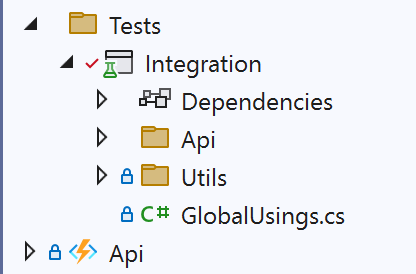
This is very convenient and worked well so far. CI/CD was unable to copy this file to the output directory:

Speaking of CI/CD, it runs on Ubuntu. That may sound surprising, but:
- the workflow file was generated by Azure
- it was easy to configure the container for CosmosDB
- .NET is cross-platform, so why not leave it like that
Reproduction and resolution
The project works fine locally, but not on CI/CD machine. The first obvious difference is the operating system, so there was only one way to understand better what happens - reproduce the error locally in the controlled environment, which is close to the CI/CD one, and so I did.
Thanks to Windows Subsystem for Linux, I already had Ubuntu installed, so that was not a big issue. I installed dotnet SDK, copied my project, ran the build and… hooray, I have the error! 😄
That allowed me to understand better what was going on. I checked the files and paths and found out that there’s actually a file called Api without any extension, and since everything in Linux is a file, even if it’s a folder, there it is! But how it appeared there…
Apparently, when building executables on Linux, dotnet does not generate .exe files since they are Windows-specific. Instead, it generates files without extensions for such projects. This approach works well in Linux, where file permissions determine executability, not the extension. Consequently, the build task for project “Integration” copied this extensionless file to its binary folder. That worked fine when the Api project was a “Class Library”, but when switching from in-process to out-of-process mode, I changed the project type to “Exe”. This change led to the creation of an extensionless file named Api, which disrupted the copying of files to the Api folder.
After I learned all of that, the fix was easy, I just renamed the folder in the “Integration” project to “ApiTests”:

That did the trick! Once again, my CI/CD runs turned green 😊
My takeaways
I hope you’ve learned something new today. As for me, I definitely have:
- Managed Azure Functions in Azure Static Web Apps are mostly the regular Azure Functions, but there are some important differences, looks like there are different environments, that are not in sync. Not everything, that worked in standalone Functions will work in managed Functions, and I guess vice versa.
- Dotnet generates extensionless files on non-Windows platforms, so for cross-platform development, it’s better to have non-conflicting folder names.
- Either Microsoft’s layoffs or their politics do not affect them in a good way. A lot of their projects like Static WebApps, OpenTelemetry Exporter, as I showed in my previous article, CosmosDb Emulator have tons of issues open, without any meaningful reaction from the MS team, although many of them are quite important. Looks like they don’t have enough headcount to tackle all these problems. That means that their stuff mostly works, but if something is not - it’s your problem.
Happy troubleshooting!
Have a question or something to say? Leave a comment ↓
Connect with me, hire, or just drop a message