Recently, I came across a one-year-old Youtube tutorial, that showed how to run ChatGPT on my own data in ~15 minutes. That sparked my interest, I thought - what if I fed ChatGPT with my codebase, so it could respond to queries like:
Where in the code is the order total compared to what’s returned by the vendor?
And it would show me code fragments with class names (I’m in C#). Or:
Please write tests for this method of this class
class code herethat will check scenarios 1.. 2.. 3..
So it would follow all naming and coding styles from my solution and use helper functions. Wouldn’t that be awesome?
I don’t usually use Python much, but I thought why not - the code is already there, I’ll just need to adjust paths and run it. Ha-ha.
RAG and Semantic Search Explained
What I wanted to run is called RAG - Retrieval Augmented Generation.
When you use ChatGPT in a browser, it’s just Generation; it relies solely on its pre-existing knowledge to generate responses. It does not know what happened after a certain date and, of course, it has no idea about your data.
If you’d like a Large Language Model (LLM) to operate with your data, you have these options:
- Train an LLM on your data. Given sizes of LLMs, this is absolutely inappropriate for most of us in terms of cost and time.
- Fine-tune an LLM. For this, you use an existing LLM but provide additional datasets to further train the model. This is a very hard thing to do properly and delivers meaningful results only in niche scenarious - not just my opinion, but a conclusion drawn after reading fine-tuning discussion on HackerNews.
- Enrich the requests you send to LLM. Send pieces of your data to the LLM and ask it to reason about your data. This is what RAG does.
RAG:
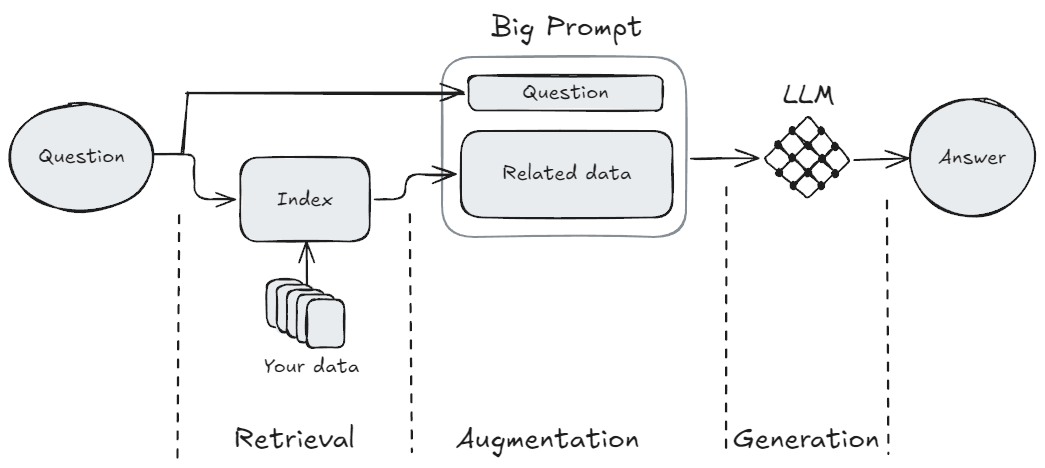
- Retrieves relevant pieces of your data. Since an LLM has a very limited “operational memory” (known as a “context window”), you need to carefully choose what to send.
- Augments your question with the related data and a prompt instruction like “Using the provided data, answer the user’s question”.
- Sends that big prompt to the LLM so it can Generate the response.
What I wanted to achieve is called semantic search - when you try to find something not by using keywords, but by using the main idea or description of the logic. For example, if I want to find where the code compares the internal order total with the vendor’s:
- With conventional search: I would find how the order total is defined - let’s say it’s a
Totalproperty of the order record. Then I would use searches likeorder.Total,po.Total,.Order.Total, or “Find Usages” to see all the places where this property is used and decide whether it’s what I need. - With semantic search: I would simply ask AI assistant “Where in the code is the order total compared to what the vendor returned?”. Much simpler, yes? But only if it works reliably. 🙂
My Experience Running RAG
The script, written in Python, leverages LangChain to build the RAG pipeline, ChromaDB to save the index between runs, and OpenAI as LLM provider.
Of course, I completed installation steps from the tutorial, but that was not enough. Before I got any meaningful outcomes, I had to follow error messages about missing packages and install a ton of other libraries - overall arount two dozen. It felt like I was downloading half of the interned - there are 383 packages installed in my .venv folder, taking up ~2.2Gb. That’s just crazy, especially coming from C#, where a full self-contained complex GUI app takes less than 250Mb.
Anyway, enough with the rant, let’s continue.
What’s worse, almost all of the packages and approaches used in the tutorial are now obsolete. I needed to figure out how to replace them, and in-browser ChatGPT was not very helpful, presumably because the content is new. I spent a couple of evenings on this and was able to run the full processing without errors or deprecation warnings.
I used LangChain guide to implement RAG with chat history and also their guide to integrate with ChromaDB. Additionaally, I needed to create OpenAI API key and deposit 5$ on the account; otherwise, even the supposedly free models did not work. Preparation: Note: if you see an error like this during the run: ValueError: Json schema does not match the Unstructured schema That means you need to handle JSON files separately - see how to in the script: I excluded Here’s the main script, please adjust paths and configuration: If you are interested, here’s the source code of the original script, that was linked in the video tutorial.If you decide to try my script outpip install langchain langchain_community langchain_chroma langchain_openai tiktoken unstructuredconstants.py, see why and what to write there in the script"*.json" from the test data but added another testDataJsonLoader, which uses JSONLoader, only for "*.json" files.import os
import sys
from langchain.chains import create_history_aware_retriever, create_retrieval_chain
from langchain.chains.combine_documents import create_stuff_documents_chain
from langchain_community.document_loaders import DirectoryLoader, TextLoader, JSONLoader
from langchain_community.chat_message_histories import ChatMessageHistory
from langchain.indexes import VectorstoreIndexCreator
from langchain.indexes.vectorstore import VectorStoreIndexWrapper
from langchain_chroma import Chroma
from langchain_openai import OpenAIEmbeddings, ChatOpenAI
from langchain_core.chat_history import BaseChatMessageHistory
from langchain_core.runnables.history import RunnableWithMessageHistory
from langchain_core.prompts import MessagesPlaceholder, ChatPromptTemplate
# Create a file nearby called constants.py and add it to .gitignore
# In this file, write:
# APIKEY = "<your key>"
# Get yours here: https://platform.openai.com/api-keys
import constants
os.environ["OPENAI_API_KEY"] = constants.APIKEY
# List available models - these are changed quite often
# Installation - pip install openai
#from openai import OpenAI
#for model in OpenAI().models.list().data:
# print(model.id)
#sys.exit()
### Configuration
# Enable to save to disk & reuse the model (for repeated queries on the same data)
PERSIST = True
persistDir = "Bin/ChromaLangchainDb"
# Start with small models, then you can improve
modelForEmbeddings = "text-embedding-3-small" # to text-embedding-3-large
modelForQA = "gpt-4o-mini" # to gpt-4 or gpt-4o
### First stage - preparing the index
embeddings = OpenAIEmbeddings(model=modelForEmbeddings)
if PERSIST and os.path.exists(persistDir):
print("Reusing index...\n")
vectorstore = Chroma(persist_directory=persistDir, embedding_function=embeddings)
index = VectorStoreIndexWrapper(vectorstore=vectorstore)
else:
print("Building index...\n")
# GLOB note: GLOB doesn't work as expected in DirectoryLoader.
# Pattern like "**/obj/**" excludes only files and first-level subfolder,
# but leaving the subfolder content included.
# To workaround that, I had to repeat this pattern for all levels
srcLoader = DirectoryLoader("Source/",
exclude=["*.sln", "*.Config", "*.DotSettings", "*.suo", "*.user", "*.cache", "*.json", "*.png",
"*.svg", "*.ico", "*.drawio", "*.nswag",
"**/.vs/**", "**/.vs/*", "**/.vs/**/*", "**/.vs/**/**/*", "**/.vs/**/**/**/*", "**/.vs/**/**/**/**/*",
"**/obj/**", "**/obj/*", "**/obj/**/*", "**/obj/**/**/*", "**/obj/**/**/**/*", "**/obj/**/**/**/**/*",
"**/bin/**", "**/bin/*", "**/bin/**/*", "**/bin/**/**/*", "**/bin/**/**/**/*", "**/bin/**/**/**/**/*"],
use_multithreading=True)
ciLoader = DirectoryLoader("CI/", exclude=["*.json"], use_multithreading=True)
docsLoader = DirectoryLoader("Docs/", exclude=["*.svg", "*.zip", "*.drawio"], use_multithreading=True)
testDataLoader = DirectoryLoader("TestData/", exclude=["*.mdf", "*.zip", "*.http", "*.json"], use_multithreading=True)
testDataJsonLoader = DirectoryLoader("TestData/", glob="*.json", loader_cls=JSONLoader, use_multithreading=True)
readmeLoader = TextLoader("README.md")
if PERSIST:
index = VectorstoreIndexCreator(embedding=embeddings, vectorstore_cls=Chroma, vectorstore_kwargs={"persist_directory":persistDir}).from_loaders([srcLoader, readmeLoader])
else:
index = VectorstoreIndexCreator(embedding=embeddings).from_loaders([srcLoader, ciLoader, docsLoader, testDataLoader, testDataJsonLoader])
### Building the conversational chain
# Basically, it consists of two parts:
# 1. Retrieving relevant documents
# 2. Answering the question based on the retrieved documents
# For the whole chain we will use this model
llm = ChatOpenAI(model=modelForQA, temperature=0) # temperature: 0.0 means deterministic, 1.0 means random
# I have 'Contributing.md' in the docs, so I ask ChatGpt to follow it when appropriate
retriever_system_prompt = (
"Given a chat history and the latest user question "
"which might reference context in the chat history, "
"formulate a standalone question which can be understood "
"without the chat history. If the question is about code, include the whole classes. "
"If the question asks about code, include the contribution guide. "
"Do NOT answer the question, "
"just reformulate it if needed and otherwise return it as is."
)
retriever_combined_prompt = ChatPromptTemplate.from_messages(
[
("system", retriever_system_prompt),
MessagesPlaceholder("chat_history"),
("human", "{input}"),
]
)
# Configure the retriever with history awareness
history_aware_retriever = create_history_aware_retriever(
llm,
# k: Amount of documents to return (Default: 4), 1 means only the most relevant document
index.vectorstore.as_retriever(search_kwargs={"k": 4}),
retriever_combined_prompt
)
# Configure the question-answering system. Here we also instruct the model to use the contribution guide
qa_system_prompt = (
"You are an assistant for question-answering tasks related to the codebase of the application"
"Use the following pieces of retrieved context to answer "
"the question. If you don't know the answer, say that you "
"don't know. Use three sentences maximum and keep the "
"answer concise, but if you asked to write code, write as much as you need"
"and by default write in C# using the latest language features and follow the contributing guide."
"\n\n"
"{context}"
)
qa_combined_prompt = ChatPromptTemplate.from_messages(
[
("system", qa_system_prompt),
MessagesPlaceholder("chat_history"),
("human", "{input}"),
]
)
question_answer_chain = create_stuff_documents_chain(llm, qa_combined_prompt)
# In-memory store for chat histories
store = {}
def get_session_history(session_id: str) -> BaseChatMessageHistory:
if session_id not in store:
store[session_id] = ChatMessageHistory()
return store[session_id]
# Assembling the chain
conversational_rag_chain = RunnableWithMessageHistory(
create_retrieval_chain(history_aware_retriever, question_answer_chain),
get_session_history,
input_messages_key="input",
history_messages_key="chat_history",
output_messages_key="answer",
)
### Running the chat
query = None
if len(sys.argv) > 1:
query = sys.argv[1]
while True:
if not query:
query = input("Prompt: ")
if query in ['quit', 'q', 'exit']:
sys.exit()
result = conversational_rag_chain.invoke({"input": query}, config={
"configurable": {"session_id": "abc123"}
})
print(result['answer'])
print()
query = None
First Success
After seeing how long it took to index my codebase, I decided to test the script on just the Readme.md file. To my delight, the script started! I was happy. I began interacting with it:
User:
How to add support for a new vendor?
ChatGPT:
To add support for a new vendor, follow these steps:
- Omitted for brevity
Once these steps are completed, the application will load the new vendor’s information on startup using reflection.
That was a promising start! It provided a meaningful advice using the information from the docs. I continued:
User:
Where can I read about this? Is there a document?
ChatGPT:
I don’t know.
Interestingly, there was actually a document titled HowToAddVendors.md. It seemed odd — ChatGPT had given me an answer but did not disclose where it got that information. I decided to rephrase my question:
User:
Where can I find more information about adding vendors?
ChatGPT:
You can find more information about adding vendors in the detailed instruction document titled “How to Add Vendors,” which is located at
Docs/HowToAddVendors.md. Make sure to read this document after reviewing the contribution guide for comprehensive guidance.
That response was much more useful! Although ChatGPT did not provide the path to the file, it referenced a section of my Readme.md:
The most expected codebase change is adding new vendors, so for this scenario I prepared a [special detailed instruction](Docs/HowToAddVendors.md). Please follow it AFTER reading the contribution guide.
At least, ChatGPT had correctly read and used this paragraph. Encouraged, I decided to proceed with testing it on my code.
First Disappointment
I included one of the projects in my C# solution into the index and asked ChatGPT my initial question:
User:
Where in the code is the order total compared to what’s returned by the vendor?
ChatGPT:
Based on the provided code snippets, there is no direct comparison of the order total to what the vendor returned. The code primarily deals with checking the confirmation number, and handling errors, but does not explicitly compare totals.
That didn’t make any sense. Which code was it referring to? If you’ve had experience with RAG, you probably know what’s going on, but I did not, so I tried to rephrase using the exact piece of code:
User:
I mean places where I compare order total and issue a warning like
Expected to have order total [{orderWithMeta.Order.Total}] but received [{response.Order.ProductSubtotal}]ChatGPT:
The provided code snippet does not include a comparison between
orderWithMeta.Order.Totalandresponse.Order.ProductSubtotalor any similar operation that issues a warning based on a discrepancy between the expected order total and the received order total. The code focuses on matching line items and handling rejected items, without comparing overall order totals.
Again… What mysterious “provided code snippet”? Anyway, I tried to point it to the concrete class that does such a comparison:
User:
What does the class
CetOrderResponseHandlerdo?ChatGPT (shortened for brevity):
The
CetOrderResponseHandlerclass implements … It converts the vendor’s response …, specifically handling the following:- It checks if the product subtotal in the vendor’s response matches the total of the order placed. If there’s a discrepancy, it adds a warning to the order’s status.
- …
- …
Yep! There it is! It has the data and can correctly reason about it!
User:
Does it compare order totals from order with the one returned from vendor?
ChatGPT:
Yes, the CetOrderResponseHandler class does compare the order totals. …
So it does have the information needed, it can reason correctly about that code, but is unable to retrieve it in the way I need. What the hell…
The Reason for Poor Answers
At that moment, feeling both overwhelmed and disappointed, I decided to seek advice. Fortunately, Toptal community was quite helpful. Valeriy Efimenko suggested:
“The issue begins with how the files are parsed. There’s a likelihood that because the data is unstructured, the parsing process mishandling it, leading to essential information being excluded.
Essentially, the better the quality of the data, the better the response.
Based on what you’ve shared, I would recommend examining how the data is fragmented, loaded, and especially retrieved upon request. Start by analyzing which vectors and which text segments are being returned as the closest matches from the Chroma database.”
I followed that and delved deeper.
Initially, I hoped to simply throw my code and docs into the script and have it sort everything out, but it was not so straightforward. I examined the Chroma DB and found that the code was chunked into ~1000-character blocks with cuts in semantically random places, which posed two issues:
- On one hand, 1000 characters are not sufficient for even a small file in its entirety.
- On the other hand, 1000 characters per chunk is too large to serve as one logical block, making it impossible to determine the core purpose of such a chunk.
This is problematic because… First, let me explain how it works.
The main purpose of the retrieval stage is to locate data (documents), relevant to the user’s query. To achieve this, the data must be indexed and prepared for fast searching. To build a semantic index, we provide a text chunk to a specialized LLM and ask it to generate what are known as embeddings for that chunk.
Simply put, an embedding is a vector positioned on multidimensional space. For example:
- We send the embedding-LLM the text “My name is Lev”
- The LLM replies: Okay, put that info here - (8, 3)
Here’s a 2-dimensional space example, and this vector points to the location of that info:
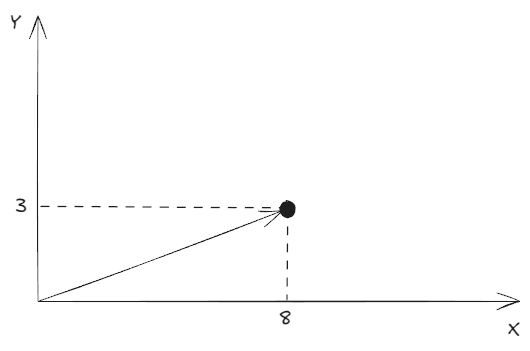
The databases saves the text “My name is Lev” to this “address”. Next, when we want an answer to a related question:
- We send to the embedding-LLM text “What is my name?”
- It replies: The answer should be somewhere near (9, 2)
Thus, we get this:
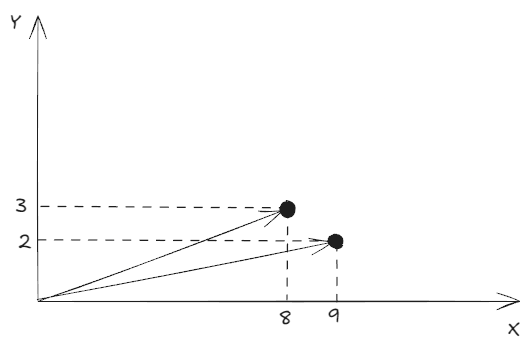
The retrieval stage then attempts to find vectors nearby (using so called cosine similarity) and ranks them by relevance (how close they are). In this example, it retrieves the existing vector (8, 3), and the index returns the corresponding text: “My name is Lev”.
In the next stage, augmentation, the initial query “What is my name?” goes to the main LLM with a prompt like
Given this context:
“My name is Lev”
Answer the user’s question:
“What is my name?”
The generation stage then provides a respone:
Your name is Lev
Returning to the chunk size, here one chunk represented one logical block, and this is why this worked great. However, if we input something like this:
My name is Lev Yastrebov, I was born …. During my childhood, I liked … I have friens A, B, C, who also went … and liked …
The embedding LLM would still assign only one vector, that is radically different, say (15, -3). Consequently, the retrieval stage would fail to find something close or might return the text at (10, 1) which states “We talked a little, he said that his name was Max”. This confusion would mislead the main LLM into providing a result like:
Your name is Max
To sum this up, any arbitrary segmentation by character limit can lead to incomplete and unreliable results, due to the failing retrieval stage.
How to Create a Good RAG
Here’s how Valeriy responded to this question:
“I would suggest that before splitting the code into chunks, it could be processed through another prompt that can provide comments, descriptions, or additional information on blocks, methods, or classes. This would then enhance the searchability in the database through natural language queries.”
Another Toptal expert, Sam Watkins, also recommends annotating the codebase:
“If you want to do a good job, plain RAG won’t work very well, as the AI won’t have a sense of the whole codebase; it will just retrieve snippets from it. I would produce summaries of each function or class, perhaps feeding in the related functions’ summaries along. Then produce a summary for the whole file or class, then put everything into some sort of RAG.
The rabbit hole turned out to be much deeper than I expected. What began as a one-evening tinkering project has now expanded significantly, and I was not prepared for that. If I want good results, I’ll need to engage in parsing, annotating, and smart chunking of code so I can feed it to the LLM by tablespoon like a baby.
Now, knowing how that should look like, I was curious to find out how other people deal with it.
OpenAI Primer
First, there’s an article in OpenAI blog titled Code search using embeddings, where they developed a Python-specialized parser and fed it extensively commented code. This confirms that annotating and smart chunking are the bare minimum for meaningful results.
Project with Only Function Extraction
The guy from the semantic code search repo extracts functions from code files and employs the CodeSearchNet model, specifically trained on code -> comments pairs for selected languages. Unfortunately, this project did not gain much traction, likely due to its limited approach in not providing multi-level code summarization.
Qdrant Tutorial with Advanced Processing
The tutorial Use semantic search to navigate your codebase treats code like code, and not merely text. They recommend extracting the logical structure and all relationships from the code using language servers, similar to how VS Code provides code completions. An important takeaway from the article:
Each programming language has its own syntax which is not a part of the natural language. Thus, a general-purpose model probably does not understand the code as is.
That’s not that obvious given how often most of us threw a code to LLM asking it to explain, and it did fairly well. However, it’s true, and so they do a lot to convert code into text: splitting CamelCase and snake_case names, removing non-literal characters, and forming sentences from code snippets. That’s quite an extensive pre-processing.
The Impact of “Humanization” of Code and Drawbacks of Wrong Chunking
The post Codebases are uniquely hard to search semantically hits right on target with its title! What I liked about this post: Daksh illustrates how significantly pre-processing code into sentences can affect similarity measurements. He also demonstrates that including irrelevant code can severely complicate finding the correct results.
Ready-to-Use Tool
The last project I came across, codeqai, is quite advanced. It uses the “treesitter” tool to parse languages into concrete syntax trees and extracts all methods with documentation. Codeqai also features incremental index updating based on git commits. By the way, the author also suggest comment generation before indexing. If I were to develop my own tool, it might resemble this one.
My Conclusion and Plans
Apparently, these AI tools are not that intelligent as media hype suggests. LLMs and GenAI have significant limitations, and it takes some hard work to overcome them.
I initially hoped for a quick “good enough” result, but it’s not possible for this use case. Therefore, I do not plan to continue refining this script, as it would need to be almost entirely rewritten and cannot remain a single script. Should the need arise, I am more likely to utilize one of the existing tools that are already well-developed.
Have a question or something to say? Leave a comment ↓
Connect with me, hire, or just drop a message