I have a Windows desktop application that I distribute using MSIX packages, making them easily installable and automatically updated on modern Windows machines. To create such a package, the most straightforward method is to use the Windows Application Packaging (WAP) project, although it does have its quirks.
Additionally, I have a utility project that doesn’t require access to Windows APIs but needs to support trimming and be as compact as possible. As a result, I ended up with this dependency graph and the following MSB6006 error:
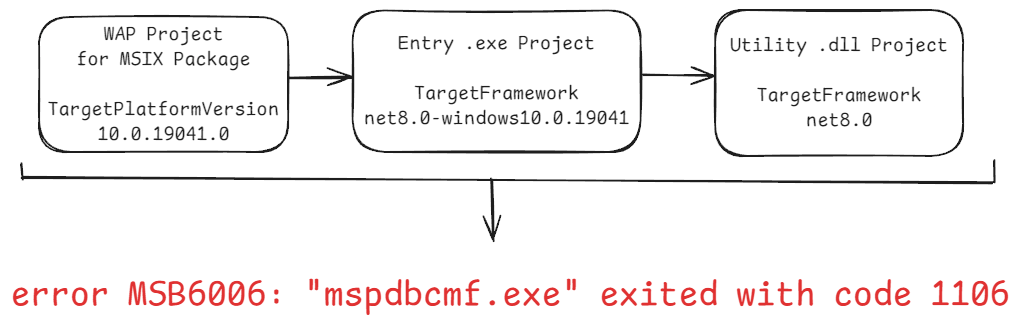
The error text for this setup was this:
D:\MySln\Installer\Installer.wapproj" (default target) (1) ->
(_GenerateAppxSymbolPackage target) ->
  C:\Program Files\Microsoft Visual Studio\2022\Community\MSBuild\Microsoft\VisualStudio\v17.0\AppxPackage\Microsoft.AppXPackage.Targets(3715,5): error MSB6006: "mspdbcmf.exe" exited with code 1106.
Digging through errors
This error seemed quite cryptic, and my internet search yielded no useful results - I mostly found bug reports that had already been fixed. Nothing was closely related to my situation. Of course, I also tested several LLMs, including freshly baked o1 from OpenAI, but again, I didn’t have much luck with them either.
Multi-targeting the utility project
I tried to set these target frameworks:
<TargetFrameworks>net8.0-windows10.0.19041;net8.0</TargetFrameworks>
However, this resulted in the exact same error. Plus, I don’t need the Windows API in this project, and it disrupts my other compact executable project, so it’s not an option anyway.
Targeting only netstandard in the utility project
Next was attempt to set this:
<TargetFrameworks>netstandard2.1</TargetFrameworks>
I did not use a lot in this project, so that might work, but I received the same error again, and in addition, build process in VisualStudio started producing strange errors too:
1>D:\MySln\Utils\obj\x64\Debug\Utils.AssemblyInfo.cs(18,38,18,61): error CS0234: The type or namespace name 'TargetPlatformAttributeAttribute' does not exist in the namespace 'System.Runtime.Versioning' (are you missing an assembly reference?)

1>D:\MySln\Utils\obj\x64\Debug\Utils.AssemblyInfo.cs(18,38,18,61): error CS0234: The type or namespace name 'TargetPlatformAttribute' does not exist in the namespace 'System.Runtime.Versioning' (are you missing an assembly reference?)

1>D:\MySln\Utils\obj\x64\Debug\Utils.AssemblyInfo.cs(19,38,19,66): error CS0234: The type or namespace name 'SupportedOSPlatformAttributeAttribute' does not exist in the namespace 'System.Runtime.Versioning' (are you missing an assembly reference?)

1>D:\MySln\Utils\obj\x64\Debug\Utils.AssemblyInfo.cs(19,38,19,66): error CS0234: The type or namespace name 'SupportedOSPlatformAttribute' does not exist in the namespace 'System.Runtime.Versioning' (are you missing an assembly reference?)
So, I ended up with even more problems than when I started 😄
Multi-targeting for the main executable
So, I then applied this:
<TargetFrameworks>net8.0-windows10.0.19041;net8.0</TargetFrameworks>
To the main executable project. That did not work too:
D:\MySln\Installer\Installer.wapproj" (default target) (1) ->
(_ConvertItems target) ->
  C:\Program Files\Microsoft Visual Studio\2022\Community\MSBuild\Microsoft\DesktopBridge\Microsoft.DesktopBridge.targets(746,5): error : Specified EntryPointExe '' was not found in the project outputs. [D:\MySln\Installer\Installer.wapproj]
Not-so-fun fact, this error occurs even when you use only one framework in this section:
<TargetFrameworks>net8.0-windows10.0.19041</TargetFrameworks>
Anyway, attempts to specify this EntryPointExe in any form I can think of also failed:
D:\MySln\Installer\Installer.wapproj" (default target) (1) ->
(_GenerateAppxPackageRecipeFile target) ->
  Package.appxmanifest : error APPX0703: Manifest references file 'MyApp\MyApp.exe' which is not part of the payload. [D:\MySln\Installer\Installer.wapproj]
I’ve also had a ton of intermittent errors, that I was unable to reproduce when writing this article. I decided to revert these experiments.
Initial solution
I was certain that there must be a way to depend on “thinner” target frameworks, like netstandard or net8.0, from “thicker” ones, like net8.0-windows, otherwise nothing would function.
So, after taking a break from the keyboard, I decided to analyze the initial error I encountered more thoroughly. I enabled verbose logging for MSBuild and it showed me this:
_GenerateAppxSymbolPackage:
  C:\Program Files\Microsoft Visual Studio\2022\Community\MSBuild\Microsoft\VisualStudio\v17.0\AppxPackage\\x64\mspdbcmf.exe /check D:\MySln\Bin\Release-x64\win-x64\msixpublish\MyApp.pdb
  Microsoft (R) FastLink To Full PDB Converter Version 14.41.33923.0
  Copyright (C) Microsoft Corporation.  All rights reserved.

  D:\MySln\Bin\Release-x64\win-x64\msixpublish\MyApp.pdb : fatal error CMF1106: failed to open input PDB file for reading (PDB error code = 13)
C:\Program Files\Microsoft Visual Studio\2022\Community\MSBuild\Microsoft\VisualStudio\v17.0\AppxPackage\Microsoft.AppXPackage.Targets(3715,5): error MSB6006: "mspdbcmf.exe" exited with code 1106. [D:\MySln\Installer\Installer.wapproj]
Now this is something! MSBuild attempted to open the PDB but failed, which only happens when one of the dependent projects has a different TargetFramework. Usually, this problem was solved easily by setting:
<TargetFramework>net8.0-windows10.0.19041</TargetFramework>
for all the projects, but in this utility project I need to keep net8.0.
Ok, but what PDBs have to do with my installer project? I distribute an app to end users, who have negative interest in debugging my app, and all PDBs are stripped in the end anyway, so why don’t just disable their generation and handling?
And so, my initial solution was to add /p:DebugSymbols=false /p:DebugType=None to my MsBuild string:
msbuild Installer/Installer.wapproj /p:Configuration=Release /p:Platform=x64 /p:AppInstallerUri=$Env:HostUri /p:DebugSymbols=false /p:DebugType=None
I was happy: project worked well from inside VisualStudio and from the build script. Unfortunately, CI/CD pipeline brought me down to the ground - after running msbuild for the whole solution, dotnet test with flag --no-build did no longer work, and looks like one .NET Framework 4.8 project was not in place - I received errors about missing file.
Apparently, msbuild with these disabled debug abilities acts differently, which was a surprise for me. I tried specifying these settings in WAP project file, but they did not have any effect.
I almost resigned myself to the idea that I’d need to hack things here and there, but then the next day…
Ultimate solution
I thought there should be a better way to disable packaging of PDB symbols. I looked again at the error text, and it stated the build target name: _GenerateAppxSymbolPackage. So, I went on googling and found one strange place, where it’s defined:
  <!-- The following target creates the appx symbol package. -->
  <Target Name="_GenerateAppxSymbolPackage"
          Condition="'$(AppxSymbolPackageEnabled)' == 'true' and
                     ...
Cool! So I know it depends on the property AppxSymbolPackageEnabled, which is defined in this specification of MSBuild types:
<xs:element name="AppxSymbolPackageEnabled" ...>
  <xs:annotation>
    <xs:documentation>Flag indicating whether to generate a symbol package when an app package is created.</xs:documentation>
Thus, the ultimate solution to this 3-day struggle was as simple as:
<AppxSymbolPackageEnabled>False</AppxSymbolPackageEnabled>
in .wapproj file’s PropertyGroup.
Perhaps in an ideal world, even symbol packaging should work fine, but I don’t need symbols anyway, so this was the perfect solution for me.
Have a question or something to say? Leave a comment ↓
Connect with me, hire, or just drop a message